My computer has gotten really sluggish lately and I wondered if reverting back to windows 98 (my computer is 6 years old, pentium II 350mhz) would help.
I have hardly anything on here, no games or programs really. I use it for music, photos, and internet.
I have two questions, first one is, would using windows 98 work better then windows XP?
Secondly, I have two hard drives in my computer, one has Windows XP and the other has Windows 98. How do I reformate the Windows 98 HDD without touching the Windows XP HDD? Do I have to change primary HDD?
edit: please see my most recent post for hijackthis log
Reformating Help edit: hijackthis readers please read <3
Moderator: Moderators
-
Nessa
- Honorary Member

- Posts: 1390
- Joined: Tue Jun 01, 2004 3:29 pm
- Location: Home Sweet Home
- Contact:
Reformating Help edit: hijackthis readers please read <3
Last edited by Nessa on Fri Nov 18, 2005 4:42 am, edited 2 times in total.
Yes, it would probably feel much faster with Windows 98, but 98 is not supported by Microsoft anymore, my suggestion would be to try to rip as much "junk" as possible from Windows XP instead. You could use http://www.nliteos.com for that task.
And when formatting your Windows 98 HDD, you can do that from your current Windows installation, probably the easiest way, or boot with the Windows 98 CD and enter DOS mode, and then type format X:, where X is the HDD you want to format.
And when formatting your Windows 98 HDD, you can do that from your current Windows installation, probably the easiest way, or boot with the Windows 98 CD and enter DOS mode, and then type format X:, where X is the HDD you want to format.

-
DiscordantNote
- Honorary Member
- Posts: 3386
- Joined: Mon May 31, 2004 4:59 pm
- Location: Lookin' through a glass onion

-
sparkygoesforth
- PPT Toddler

- Posts: 247
- Joined: Mon May 31, 2004 1:26 pm
- Location: UK
Before you get too carried away - have you tried checking for spyware and viruses? Run a spyware app. like AdAware first - if your computer was running okay before but has since slowed down it may be due to some nasties slowing it down.
If you do find a Win98 CD and want to install it, check if it's a clean install CD or an upgrade one - a 'clean install' CD will not work if you already have a version of Windows on your hard disk, conversely an 'upgrade' one will not work on a blank hard disk. Guess how I found that out?
If you do find a Win98 CD and want to install it, check if it's a clean install CD or an upgrade one - a 'clean install' CD will not work if you already have a version of Windows on your hard disk, conversely an 'upgrade' one will not work on a blank hard disk. Guess how I found that out?
-
sparkygoesforth
- PPT Toddler
- Posts: 247
- Joined: Mon May 31, 2004 1:26 pm
- Location: UK

-
freddyflinstone
- PPT Trainee

- Posts: 665
- Joined: Wed Oct 05, 2005 4:41 pm
- Location: Ontario, Canada
Nessa wrote:Hi, thanks for your help Ibis & Discordant Note, but unfortunatly my dad tried to install 98 on another comptuer and deemed the CD "worthless" as it would't work... and threw it away.
About nliteos, do I have to reinstall windows XP to use it? I'm a bit confused. .-.
you could always check thaat the windows 98 cd is on the hard drive of the other computer
check c:\windows\options\cabs or c:\win98 to see if the .cab files are there - if they are - burn them to a cd and you will now have a way to format and re-install 98 (with the use of a bootable floppy)

-
ArwenEarendil
- PPT Warrior

- Posts: 765
- Joined: Thu Jun 17, 2004 1:28 pm
- Location: Among the crayons on my desk..
Another problem (that is usually overlooked) is fragmentation.
Fragmentation of a file means that parts of the file are all over the place on your HDD. By defragging your HDD, you are basically reordering the parts of your files so that they can be found faster.
I'm not sure if 98 comes with defragger; I know XP does. The thing with defragging is that it takes a LONG time, especially when you haven't defragged, or have never, in a long time. Find some time when you don't need the computer. Run the defragger when you are done with the computer, and let it run overnight. You might even need to let it continue to run the next day.
You also mention that you have two HDDs in your computer. If you stick in an OS disk, or a quick restore disk, you can choose the HDD you want to apply your actions to.
Oh, and about why your dad threw away the disk... If he had sucessfully installed it on another computer, it wouldn't work anyways. Microsoft keeps track of activated CD-keys. After 30-90 days (I can't remember the exact number), you won't be able to use 98, short of replacing winlogin.exe with a pirated file. But that's an entirely different story.
Fragmentation of a file means that parts of the file are all over the place on your HDD. By defragging your HDD, you are basically reordering the parts of your files so that they can be found faster.
I'm not sure if 98 comes with defragger; I know XP does. The thing with defragging is that it takes a LONG time, especially when you haven't defragged, or have never, in a long time. Find some time when you don't need the computer. Run the defragger when you are done with the computer, and let it run overnight. You might even need to let it continue to run the next day.
You also mention that you have two HDDs in your computer. If you stick in an OS disk, or a quick restore disk, you can choose the HDD you want to apply your actions to.
Oh, and about why your dad threw away the disk... If he had sucessfully installed it on another computer, it wouldn't work anyways. Microsoft keeps track of activated CD-keys. After 30-90 days (I can't remember the exact number), you won't be able to use 98, short of replacing winlogin.exe with a pirated file. But that's an entirely different story.

. Set by Medusa ♥
-
Nessa
- Honorary Member
- Posts: 1390
- Joined: Tue Jun 01, 2004 3:29 pm
- Location: Home Sweet Home
- Contact:
Ok, I am guilty of not defragging my computer enough, but I recently ran a virus scan (norton antivirus v.2005) and came out clean as a whistle. I use spybot S&D, adaware, and spyware blaster for spyware nasties.
I ran a hijackthis:
Logfile of HijackThis v1.99.1
Scan saved at 9:25:27 PM, on 11/17/2005
Platform: Windows XP SP2 (WinNT 5.01.2600)
MSIE: Internet Explorer v6.00 SP2 (6.00.2900.2180)
Running processes:
C:\WINDOWS\System32\smss.exe
C:\WINDOWS\system32\winlogon.exe
C:\WINDOWS\system32\services.exe
C:\WINDOWS\system32\lsass.exe
C:\WINDOWS\system32\svchost.exe
C:\WINDOWS\System32\svchost.exe
C:\Program Files\Common Files\Symantec Shared\ccSetMgr.exe
C:\Program Files\Common Files\Symantec Shared\SNDSrvc.exe
C:\Program Files\Common Files\Symantec Shared\ccEvtMgr.exe
C:\WINDOWS\system32\spoolsv.exe
C:\Program Files\Norton AntiVirus\navapsvc.exe
C:\Program Files\Norton AntiVirus\IWP\NPFMntor.exe
C:\Program Files\Norton AntiVirus\AdvTools\NPROTECT.EXE
C:\WINDOWS\System32\svchost.exe
C:\Program Files\Common Files\Symantec Shared\CCPD-LC\symlcsvc.exe
C:\WINDOWS\Explorer.EXE
C:\Program Files\Common Files\Symantec Shared\ccApp.exe
C:\Program Files\Yahoo!\Messenger\ypager.exe
C:\Program Files\AIM\aim.exe
C:\Program Files\Internet Explorer\iexplore.exe
C:\Program Files\Mozilla Firefox\firefox.exe
C:\Program Files\Messenger\msmsgs.exe
C:\Documents and Settings\Vanessa\Desktop\HijackThis.exe
R0 - HKCU\Software\Microsoft\Internet Explorer\Main,Start Page = http://www.livejournal.com/
R1 - HKLM\Software\Microsoft\Internet Explorer\Main,Default_Page_URL = http://red.clientapps.yahoo.com/customi ... .yahoo.com
R1 - HKLM\Software\Microsoft\Internet Explorer\Main,Search Bar = http://red.clientapps.yahoo.com/customi ... earch.html
R0 - HKLM\Software\Microsoft\Internet Explorer\Main,Start Page = http://red.clientapps.yahoo.com/customi ... .yahoo.com
R1 - HKCU\Software\Microsoft\Internet Explorer\Main,Window Title = Teh Intern3t
O2 - BHO: AcroIEHlprObj Class - {06849E9F-C8D7-4D59-B87D-784B7D6BE0B3} - C:\Program Files\Adobe\Acrobat 7.0\ActiveX\AcroIEHelper.dll
O2 - BHO: (no name) - {53707962-6F74-2D53-2644-206D7942484F} - C:\PROGRA~1\SPYBOT~1\SDHelper.dll
O2 - BHO: UberButton Class - {5BAB4B5B-68BC-4B02-94D6-2FC0DE4A7897} - C:\Program Files\Yahoo!\Common\yiesrvc.dll
O2 - BHO: YahooTaggedBM Class - {65D886A2-7CA7-479B-BB95-14D1EFB7946A} - C:\Program Files\Yahoo!\Common\YIeTagBm.dll
O2 - BHO: Google Toolbar Helper - {AA58ED58-01DD-4d91-8333-CF10577473F7} - c:\program files\google\googletoolbar1.dll
O2 - BHO: NAV Helper - {BDF3E430-B101-42AD-A544-FADC6B084872} - C:\Program Files\Norton AntiVirus\NavShExt.dll
O3 - Toolbar: (no name) - {BA52B914-B692-46c4-B683-905236F6F655} - (no file)
O3 - Toolbar: Norton AntiVirus - {42CDD1BF-3FFB-4238-8AD1-7859DF00B1D6} - C:\Program Files\Norton AntiVirus\NavShExt.dll
O3 - Toolbar: &Google - {2318C2B1-4965-11d4-9B18-009027A5CD4F} - c:\program files\google\googletoolbar1.dll
O4 - HKLM\..\Run: [navapp] C:\Program Files\NavExcel\NavHelper\v2.0.4d\navapp.exe
O4 - HKLM\..\Run: [Logitech Hardware Abstraction Layer] KHALMNPR.EXE
O4 - HKLM\..\Run: [ccApp] "C:\Program Files\Common Files\Symantec Shared\ccApp.exe"
O4 - HKLM\..\Run: [Advanced Tools Check] C:\PROGRA~1\NORTON~2\AdvTools\ADVCHK.EXE
O4 - HKLM\..\Run: [Symantec NetDriver Monitor] C:\PROGRA~1\SYMNET~1\SNDMon.exe /Consumer
O4 - HKLM\..\Run: [MSConfig] C:\WINDOWS\PCHealth\HelpCtr\Binaries\MSConfig.exe /auto
O4 - HKCU\..\Run: [Yahoo! Pager] "C:\Program Files\Yahoo!\Messenger\ypager.exe" -quiet
O6 - HKCU\Software\Policies\Microsoft\Internet Explorer\Restrictions present
O6 - HKCU\Software\Policies\Microsoft\Internet Explorer\Control Panel present
O8 - Extra context menu item: &Google Search - res://C:\Program Files\Google\GoogleToolbar1.dll/cmsearch.html
O8 - Extra context menu item: &Translate English Word - res://C:\Program Files\Google\GoogleToolbar1.dll/cmwordtrans.html
O8 - Extra context menu item: &Yahoo! Search - file:///C:\Program Files\Yahoo!\Common/ycsrch.htm
O8 - Extra context menu item: Backward Links - res://C:\Program Files\Google\GoogleToolbar1.dll/cmbacklinks.html
O8 - Extra context menu item: Cached Snapshot of Page - res://C:\Program Files\Google\GoogleToolbar1.dll/cmcache.html
O8 - Extra context menu item: Similar Pages - res://C:\Program Files\Google\GoogleToolbar1.dll/cmsimilar.html
O8 - Extra context menu item: Translate Page into English - res://C:\Program Files\Google\GoogleToolbar1.dll/cmtrans.html
O8 - Extra context menu item: Yahoo! &Dictionary - file:///C:\Program Files\Yahoo!\Common/ycdict.htm
O8 - Extra context menu item: Yahoo! &Maps - file:///C:\Program Files\Yahoo!\Common/ycmap.htm
O8 - Extra context menu item: Yahoo! &SMS - file:///C:\Program Files\Yahoo!\Common/ycsms.htm
O9 - Extra button: (no name) - {08B0E5C0-4FCB-11CF-AAA5-00401C608501} - C:\WINDOWS\System32\msjava.dll
O9 - Extra 'Tools' menuitem: Sun Java Console - {08B0E5C0-4FCB-11CF-AAA5-00401C608501} - C:\WINDOWS\System32\msjava.dll
O9 - Extra button: Yahoo! Services - {5BAB4B5B-68BC-4B02-94D6-2FC0DE4A7897} - C:\Program Files\Yahoo!\Common\yiesrvc.dll
O9 - Extra button: AIM - {AC9E2541-2814-11d5-BC6D-00B0D0A1DE45} - C:\Program Files\AIM\aim.exe
O9 - Extra button: Messenger - {FB5F1910-F110-11d2-BB9E-00C04F795683} - C:\Program Files\Messenger\msmsgs.exe
O9 - Extra 'Tools' menuitem: Windows Messenger - {FB5F1910-F110-11d2-BB9E-00C04F795683} - C:\Program Files\Messenger\msmsgs.exe
O16 - DPF: Yahoo! Checkers - http://download.games.yahoo.com/games/c ... /kt3_x.cab
O16 - DPF: Yahoo! Chinese Checkers - http://download.games.yahoo.com/games/c ... cct0_x.cab
O16 - DPF: Yahoo! Poker - http://download.games.yahoo.com/games/c ... /pt0_x.cab
O16 - DPF: Yahoo! Word Racer - http://download.games.yahoo.com/games/c ... /wt0_x.cab
O16 - DPF: {17492023-C23A-453E-A040-C7C580BBF700} (Windows Genuine Advantage Validation Tool) - http://go.microsoft.com/fwlink/?linkid=39204
O16 - DPF: {30528230-99F7-4BB4-88D8-FA1D4F56A2AB} (YInstStarter Class) - C:\Program Files\Yahoo!\common\yinsthelper.dll
O16 - DPF: {4ED9DDF0-7479-4BBE-9335-5A1EDB1D8A21} - http://download.mcafee.com/molbin/share ... insctl.cab
O16 - DPF: {54823A9D-6BAE-11D5-B519-0050BA2413EB} (ChkDVDCtl Class) - http://www.gocyberlink.com/winxp/CheckDVD.cab
O16 - DPF: {640B39C1-D713-464F-92C3-75BD972B95EE} - http://www.sidestep.com/get/k00719/sb02a.cab
O16 - DPF: {A17E30C4-A9BA-11D4-8673-60DB54C10000} (YahooYMailTo Class) - http://us.dl1.yimg.com/download.yahoo.c ... pi_416.dll
O16 - DPF: {B38870E4-7ECB-40DA-8C6A-595F0A5519FF} (MsnMessengerSetupDownloadControl Class) - http://messenger.msn.com/download/MsnMe ... loader.cab
O16 - DPF: {B9191F79-5613-4C76-AA2A-398534BB8999} - http://us.dl1.yimg.com/download.yahoo.c ... mplete.cab
O16 - DPF: {BCC0FF27-31D9-4614-A68E-C18E1ADA4389} - http://download.mcafee.com/molbin/share ... cgdmgr.cab
O23 - Service: Symantec Event Manager (ccEvtMgr) - Symantec Corporation - C:\Program Files\Common Files\Symantec Shared\ccEvtMgr.exe
O23 - Service: Symantec Password Validation (ccPwdSvc) - Symantec Corporation - C:\Program Files\Common Files\Symantec Shared\ccPwdSvc.exe
O23 - Service: Symantec Settings Manager (ccSetMgr) - Symantec Corporation - C:\Program Files\Common Files\Symantec Shared\ccSetMgr.exe
O23 - Service: Macromedia Licensing Service - Unknown owner - C:\Program Files\Common Files\Macromedia Shared\Service\Macromedia Licensing.exe
O23 - Service: Norton AntiVirus Auto-Protect Service (navapsvc) - Symantec Corporation - C:\Program Files\Norton AntiVirus\navapsvc.exe
O23 - Service: Norton AntiVirus Firewall Monitor Service (NPFMntor) - Symantec Corporation - C:\Program Files\Norton AntiVirus\IWP\NPFMntor.exe
O23 - Service: Norton Unerase Protection (NProtectService) - Symantec Corporation - C:\Program Files\Norton AntiVirus\AdvTools\NPROTECT.EXE
O23 - Service: SAVScan - Symantec Corporation - C:\Program Files\Norton AntiVirus\SAVScan.exe
O23 - Service: ScriptBlocking Service (SBService) - Symantec Corporation - C:\PROGRA~1\COMMON~1\SYMANT~1\SCRIPT~1\SBServ.exe
O23 - Service: Symantec Network Drivers Service (SNDSrvc) - Symantec Corporation - C:\Program Files\Common Files\Symantec Shared\SNDSrvc.exe
O23 - Service: Symantec SPBBCSvc (SPBBCSvc) - Symantec Corporation - C:\Program Files\Common Files\Symantec Shared\SPBBC\SPBBCSvc.exe
O23 - Service: Sony SPTI Service (SPTISRV) - Sony Corporation - C:\Program Files\Common Files\Sony Shared\AVLib\SPTISRV.exe
O23 - Service: Symantec Core LC - Symantec Corporation - C:\Program Files\Common Files\Symantec Shared\CCPD-LC\symlcsvc.exe
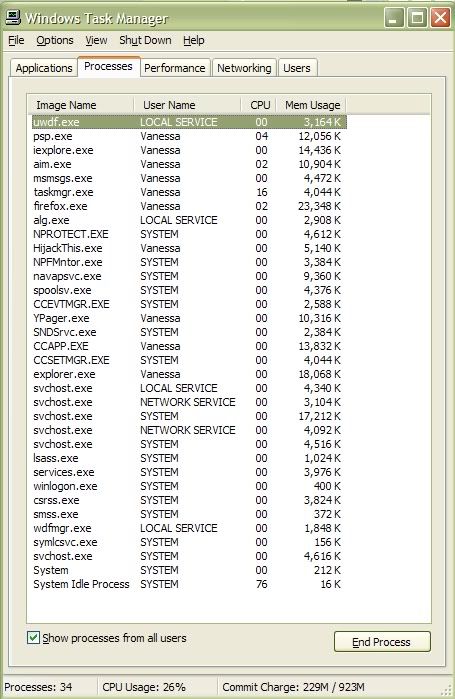
i also took a screenshot of running processes... maybe someone can explain why theres six svchost.exe ?
freddyflinstone Thanks for the tip... I'll look for .cab files later =) I know that the windows 98disc isn't in the drive, because he had me throw it out lol.
ArwenEarendil Yes, 98 does come with a defragger. The last time my computer was defragged, was probably around 6months ago. I'll do it again this week sometime, but I'm not expected it to speed my computer up emensly.
I ran a hijackthis:
Logfile of HijackThis v1.99.1
Scan saved at 9:25:27 PM, on 11/17/2005
Platform: Windows XP SP2 (WinNT 5.01.2600)
MSIE: Internet Explorer v6.00 SP2 (6.00.2900.2180)
Running processes:
C:\WINDOWS\System32\smss.exe
C:\WINDOWS\system32\winlogon.exe
C:\WINDOWS\system32\services.exe
C:\WINDOWS\system32\lsass.exe
C:\WINDOWS\system32\svchost.exe
C:\WINDOWS\System32\svchost.exe
C:\Program Files\Common Files\Symantec Shared\ccSetMgr.exe
C:\Program Files\Common Files\Symantec Shared\SNDSrvc.exe
C:\Program Files\Common Files\Symantec Shared\ccEvtMgr.exe
C:\WINDOWS\system32\spoolsv.exe
C:\Program Files\Norton AntiVirus\navapsvc.exe
C:\Program Files\Norton AntiVirus\IWP\NPFMntor.exe
C:\Program Files\Norton AntiVirus\AdvTools\NPROTECT.EXE
C:\WINDOWS\System32\svchost.exe
C:\Program Files\Common Files\Symantec Shared\CCPD-LC\symlcsvc.exe
C:\WINDOWS\Explorer.EXE
C:\Program Files\Common Files\Symantec Shared\ccApp.exe
C:\Program Files\Yahoo!\Messenger\ypager.exe
C:\Program Files\AIM\aim.exe
C:\Program Files\Internet Explorer\iexplore.exe
C:\Program Files\Mozilla Firefox\firefox.exe
C:\Program Files\Messenger\msmsgs.exe
C:\Documents and Settings\Vanessa\Desktop\HijackThis.exe
R0 - HKCU\Software\Microsoft\Internet Explorer\Main,Start Page = http://www.livejournal.com/
R1 - HKLM\Software\Microsoft\Internet Explorer\Main,Default_Page_URL = http://red.clientapps.yahoo.com/customi ... .yahoo.com
R1 - HKLM\Software\Microsoft\Internet Explorer\Main,Search Bar = http://red.clientapps.yahoo.com/customi ... earch.html
R0 - HKLM\Software\Microsoft\Internet Explorer\Main,Start Page = http://red.clientapps.yahoo.com/customi ... .yahoo.com
R1 - HKCU\Software\Microsoft\Internet Explorer\Main,Window Title = Teh Intern3t
O2 - BHO: AcroIEHlprObj Class - {06849E9F-C8D7-4D59-B87D-784B7D6BE0B3} - C:\Program Files\Adobe\Acrobat 7.0\ActiveX\AcroIEHelper.dll
O2 - BHO: (no name) - {53707962-6F74-2D53-2644-206D7942484F} - C:\PROGRA~1\SPYBOT~1\SDHelper.dll
O2 - BHO: UberButton Class - {5BAB4B5B-68BC-4B02-94D6-2FC0DE4A7897} - C:\Program Files\Yahoo!\Common\yiesrvc.dll
O2 - BHO: YahooTaggedBM Class - {65D886A2-7CA7-479B-BB95-14D1EFB7946A} - C:\Program Files\Yahoo!\Common\YIeTagBm.dll
O2 - BHO: Google Toolbar Helper - {AA58ED58-01DD-4d91-8333-CF10577473F7} - c:\program files\google\googletoolbar1.dll
O2 - BHO: NAV Helper - {BDF3E430-B101-42AD-A544-FADC6B084872} - C:\Program Files\Norton AntiVirus\NavShExt.dll
O3 - Toolbar: (no name) - {BA52B914-B692-46c4-B683-905236F6F655} - (no file)
O3 - Toolbar: Norton AntiVirus - {42CDD1BF-3FFB-4238-8AD1-7859DF00B1D6} - C:\Program Files\Norton AntiVirus\NavShExt.dll
O3 - Toolbar: &Google - {2318C2B1-4965-11d4-9B18-009027A5CD4F} - c:\program files\google\googletoolbar1.dll
O4 - HKLM\..\Run: [navapp] C:\Program Files\NavExcel\NavHelper\v2.0.4d\navapp.exe
O4 - HKLM\..\Run: [Logitech Hardware Abstraction Layer] KHALMNPR.EXE
O4 - HKLM\..\Run: [ccApp] "C:\Program Files\Common Files\Symantec Shared\ccApp.exe"
O4 - HKLM\..\Run: [Advanced Tools Check] C:\PROGRA~1\NORTON~2\AdvTools\ADVCHK.EXE
O4 - HKLM\..\Run: [Symantec NetDriver Monitor] C:\PROGRA~1\SYMNET~1\SNDMon.exe /Consumer
O4 - HKLM\..\Run: [MSConfig] C:\WINDOWS\PCHealth\HelpCtr\Binaries\MSConfig.exe /auto
O4 - HKCU\..\Run: [Yahoo! Pager] "C:\Program Files\Yahoo!\Messenger\ypager.exe" -quiet
O6 - HKCU\Software\Policies\Microsoft\Internet Explorer\Restrictions present
O6 - HKCU\Software\Policies\Microsoft\Internet Explorer\Control Panel present
O8 - Extra context menu item: &Google Search - res://C:\Program Files\Google\GoogleToolbar1.dll/cmsearch.html
O8 - Extra context menu item: &Translate English Word - res://C:\Program Files\Google\GoogleToolbar1.dll/cmwordtrans.html
O8 - Extra context menu item: &Yahoo! Search - file:///C:\Program Files\Yahoo!\Common/ycsrch.htm
O8 - Extra context menu item: Backward Links - res://C:\Program Files\Google\GoogleToolbar1.dll/cmbacklinks.html
O8 - Extra context menu item: Cached Snapshot of Page - res://C:\Program Files\Google\GoogleToolbar1.dll/cmcache.html
O8 - Extra context menu item: Similar Pages - res://C:\Program Files\Google\GoogleToolbar1.dll/cmsimilar.html
O8 - Extra context menu item: Translate Page into English - res://C:\Program Files\Google\GoogleToolbar1.dll/cmtrans.html
O8 - Extra context menu item: Yahoo! &Dictionary - file:///C:\Program Files\Yahoo!\Common/ycdict.htm
O8 - Extra context menu item: Yahoo! &Maps - file:///C:\Program Files\Yahoo!\Common/ycmap.htm
O8 - Extra context menu item: Yahoo! &SMS - file:///C:\Program Files\Yahoo!\Common/ycsms.htm
O9 - Extra button: (no name) - {08B0E5C0-4FCB-11CF-AAA5-00401C608501} - C:\WINDOWS\System32\msjava.dll
O9 - Extra 'Tools' menuitem: Sun Java Console - {08B0E5C0-4FCB-11CF-AAA5-00401C608501} - C:\WINDOWS\System32\msjava.dll
O9 - Extra button: Yahoo! Services - {5BAB4B5B-68BC-4B02-94D6-2FC0DE4A7897} - C:\Program Files\Yahoo!\Common\yiesrvc.dll
O9 - Extra button: AIM - {AC9E2541-2814-11d5-BC6D-00B0D0A1DE45} - C:\Program Files\AIM\aim.exe
O9 - Extra button: Messenger - {FB5F1910-F110-11d2-BB9E-00C04F795683} - C:\Program Files\Messenger\msmsgs.exe
O9 - Extra 'Tools' menuitem: Windows Messenger - {FB5F1910-F110-11d2-BB9E-00C04F795683} - C:\Program Files\Messenger\msmsgs.exe
O16 - DPF: Yahoo! Checkers - http://download.games.yahoo.com/games/c ... /kt3_x.cab
O16 - DPF: Yahoo! Chinese Checkers - http://download.games.yahoo.com/games/c ... cct0_x.cab
O16 - DPF: Yahoo! Poker - http://download.games.yahoo.com/games/c ... /pt0_x.cab
O16 - DPF: Yahoo! Word Racer - http://download.games.yahoo.com/games/c ... /wt0_x.cab
O16 - DPF: {17492023-C23A-453E-A040-C7C580BBF700} (Windows Genuine Advantage Validation Tool) - http://go.microsoft.com/fwlink/?linkid=39204
O16 - DPF: {30528230-99F7-4BB4-88D8-FA1D4F56A2AB} (YInstStarter Class) - C:\Program Files\Yahoo!\common\yinsthelper.dll
O16 - DPF: {4ED9DDF0-7479-4BBE-9335-5A1EDB1D8A21} - http://download.mcafee.com/molbin/share ... insctl.cab
O16 - DPF: {54823A9D-6BAE-11D5-B519-0050BA2413EB} (ChkDVDCtl Class) - http://www.gocyberlink.com/winxp/CheckDVD.cab
O16 - DPF: {640B39C1-D713-464F-92C3-75BD972B95EE} - http://www.sidestep.com/get/k00719/sb02a.cab
O16 - DPF: {A17E30C4-A9BA-11D4-8673-60DB54C10000} (YahooYMailTo Class) - http://us.dl1.yimg.com/download.yahoo.c ... pi_416.dll
O16 - DPF: {B38870E4-7ECB-40DA-8C6A-595F0A5519FF} (MsnMessengerSetupDownloadControl Class) - http://messenger.msn.com/download/MsnMe ... loader.cab
O16 - DPF: {B9191F79-5613-4C76-AA2A-398534BB8999} - http://us.dl1.yimg.com/download.yahoo.c ... mplete.cab
O16 - DPF: {BCC0FF27-31D9-4614-A68E-C18E1ADA4389} - http://download.mcafee.com/molbin/share ... cgdmgr.cab
O23 - Service: Symantec Event Manager (ccEvtMgr) - Symantec Corporation - C:\Program Files\Common Files\Symantec Shared\ccEvtMgr.exe
O23 - Service: Symantec Password Validation (ccPwdSvc) - Symantec Corporation - C:\Program Files\Common Files\Symantec Shared\ccPwdSvc.exe
O23 - Service: Symantec Settings Manager (ccSetMgr) - Symantec Corporation - C:\Program Files\Common Files\Symantec Shared\ccSetMgr.exe
O23 - Service: Macromedia Licensing Service - Unknown owner - C:\Program Files\Common Files\Macromedia Shared\Service\Macromedia Licensing.exe
O23 - Service: Norton AntiVirus Auto-Protect Service (navapsvc) - Symantec Corporation - C:\Program Files\Norton AntiVirus\navapsvc.exe
O23 - Service: Norton AntiVirus Firewall Monitor Service (NPFMntor) - Symantec Corporation - C:\Program Files\Norton AntiVirus\IWP\NPFMntor.exe
O23 - Service: Norton Unerase Protection (NProtectService) - Symantec Corporation - C:\Program Files\Norton AntiVirus\AdvTools\NPROTECT.EXE
O23 - Service: SAVScan - Symantec Corporation - C:\Program Files\Norton AntiVirus\SAVScan.exe
O23 - Service: ScriptBlocking Service (SBService) - Symantec Corporation - C:\PROGRA~1\COMMON~1\SYMANT~1\SCRIPT~1\SBServ.exe
O23 - Service: Symantec Network Drivers Service (SNDSrvc) - Symantec Corporation - C:\Program Files\Common Files\Symantec Shared\SNDSrvc.exe
O23 - Service: Symantec SPBBCSvc (SPBBCSvc) - Symantec Corporation - C:\Program Files\Common Files\Symantec Shared\SPBBC\SPBBCSvc.exe
O23 - Service: Sony SPTI Service (SPTISRV) - Sony Corporation - C:\Program Files\Common Files\Sony Shared\AVLib\SPTISRV.exe
O23 - Service: Symantec Core LC - Symantec Corporation - C:\Program Files\Common Files\Symantec Shared\CCPD-LC\symlcsvc.exe
i also took a screenshot of running processes... maybe someone can explain why theres six svchost.exe ?
freddyflinstone Thanks for the tip... I'll look for .cab files later =) I know that the windows 98disc isn't in the drive, because he had me throw it out lol.
ArwenEarendil Yes, 98 does come with a defragger. The last time my computer was defragged, was probably around 6months ago. I'll do it again this week sometime, but I'm not expected it to speed my computer up emensly.
-
everconfused
- Beyond Godly
- Posts: 3041
- Joined: Thu Jun 03, 2004 5:27 am
- Location: at the late night science fiction picture show
Hi
I just read your HijackThis log. I have a concern with Sidestep. Found this with a google search: http://www.doxdesk.com/parasite/SideStep.html Note that it says parasite.
It could just be that you haven't defragged (I do that once a month so it doesn't take forever) and also you should be using your Disk Cleanup (start, programs, accessories, system tools) ... every day if possible. I clear everything - cookies, temp cache including offline, history, then run my Zonealarm privacy to clear anything else out, then use the disk cleanup. Takes under 5 minutes if you do it regularly.
Also, the google toolbar. Do you really need that? I just don't like d/l toolbars, having had problems with those. And do you need all the different messengers? Those can use alot of space.
As far as all the svchost.exe, can't help there. I have 5 of those in my processes too.
I just read your HijackThis log. I have a concern with Sidestep. Found this with a google search: http://www.doxdesk.com/parasite/SideStep.html Note that it says parasite.
It could just be that you haven't defragged (I do that once a month so it doesn't take forever) and also you should be using your Disk Cleanup (start, programs, accessories, system tools) ... every day if possible. I clear everything - cookies, temp cache including offline, history, then run my Zonealarm privacy to clear anything else out, then use the disk cleanup. Takes under 5 minutes if you do it regularly.
Also, the google toolbar. Do you really need that? I just don't like d/l toolbars, having had problems with those. And do you need all the different messengers? Those can use alot of space.
As far as all the svchost.exe, can't help there. I have 5 of those in my processes too.


-
mogster500
- PPT Trainee
- Posts: 653
- Joined: Wed Mar 30, 2005 5:51 pm
I used to work at spywareinfo, so I can help. The only entries I see wrong are along with sidestep:
O3 - Toolbar: (no name) - {BA52B914-B692-46c4-B683-905236F6F655} - (no file)
O4 - HKLM\..\Run: [navapp] C:\Program Files\NavExcel\NavHelper\v2.0.4d\navapp.exe
Part of NavExcel spyware
http://www.doxdesk.com/parasite/NavExcel.html
You might want to run an online virus scan, I found with Norton that it doesn't always find some viruses.
A good virus scan is the housecall virus scan: http://housecall.antivirus.com/housecall/start_corp.asp
Another thing to do is delete all files in the temp folder.
C:\Documents and Settings\*Your logon name here*\Local Settings\Temp
All files in that folder can be deleted.
O3 - Toolbar: (no name) - {BA52B914-B692-46c4-B683-905236F6F655} - (no file)
O4 - HKLM\..\Run: [navapp] C:\Program Files\NavExcel\NavHelper\v2.0.4d\navapp.exe
Part of NavExcel spyware
http://www.doxdesk.com/parasite/NavExcel.html
You might want to run an online virus scan, I found with Norton that it doesn't always find some viruses.
A good virus scan is the housecall virus scan: http://housecall.antivirus.com/housecall/start_corp.asp
Another thing to do is delete all files in the temp folder.
C:\Documents and Settings\*Your logon name here*\Local Settings\Temp
All files in that folder can be deleted.

-
freddyflinstone
- PPT Trainee
- Posts: 665
- Joined: Wed Oct 05, 2005 4:41 pm
- Location: Ontario, Canada
there is a online hijackthis log file analyser by the people who wrote the program
if you goto http://www.hijackthis.de - you can copy and paste your log into it - and it will tell you whats good and whats bad
if you goto http://www.hijackthis.de - you can copy and paste your log into it - and it will tell you whats good and whats bad
-
Bangel
- Honorary Member
- Posts: 6220
- Joined: Tue Jun 01, 2004 3:02 am
- Location: sakura makes dreams come true.
Google toolbar = bad.
My advice is to get rid of that quickly. Its pop up blocker is complete rubbish anyway... and if I remember correctly, it did some pretty bad stuff when we had it. Was a while back, yes, but I do remember ultimately we had to get rid of it eventually.
My advice is to get rid of that quickly. Its pop up blocker is complete rubbish anyway... and if I remember correctly, it did some pretty bad stuff when we had it. Was a while back, yes, but I do remember ultimately we had to get rid of it eventually.

the greatest love story never told.
Bangel wrote:Google toolbar = bad.
My advice is to get rid of that quickly. Its pop up blocker is complete rubbish anyway... and if I remember correctly, it did some pretty bad stuff when we had it. Was a while back, yes, but I do remember ultimately we had to get rid of it eventually.
No it's not.
I've had it for a year, and I've never had a problem with it.
Gone, forever.