Saving with photoshop...

An artistic oracle. Meet fellow creators and swap advice. Every skill you can imagine is on show.

Moderator: Moderators

Locked
Message
Author
Shifty
Beyond Godly
Beyond Godly
Posts: 3431
Joined: Mon May 31, 2004 6:31 am
Location: NYC & The Holy Land

Saving with photoshop...

#1 Post by Shifty »

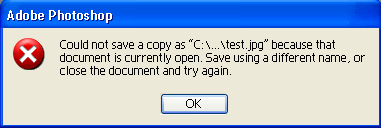
When ever I try saving something with photoshop I get this:

Image

So instead, I used the 'Save for web...' button...
Now I recently found out that the 'save as' works fine, but:

1. Can I fix this 'Saving' Problem?
2. Is there anyway I can save some thing, then open it again to edit it? I mean, under what format do I have to save it as?

Thanks :)
Image
~Set by moogie~
robot
Honorary Member
Honorary Member
Posts: 1341
Joined: Mon May 31, 2004 9:43 pm
Location: Antarctica

#2 Post by robot »

Did you try saving it with a different name?
Image
Marissa
Honorary Member
Honorary Member
Posts: 401
Joined: Mon May 31, 2004 6:29 am

#3 Post by Marissa »

Since it's a *.jpg, I recommend you save it as a *.psd. *.jpg is a lossy format, meaning the more you edit it, the more quality will be lost. It generally looks just fine after one or two edits and resaves, but beyond that it gets pretty bad.
Image
Shifty
Beyond Godly
Beyond Godly
Posts: 3431
Joined: Mon May 31, 2004 6:31 am
Location: NYC & The Holy Land

#4 Post by Shifty »

robot wrote:Did you try saving it with a different name?

Yes, it's not the name, this happens with any picture I try to save.

Marissa wrote:Since it's a *.jpg, I recommend you save it as a *.psd. *.jpg is a lossy format, meaning the more you edit it, the more quality will be lost. It generally looks just fine after one or two edits and resaves, but beyond that it gets pretty bad.

But by editing, will it open up all the layers? So say if I wanted to fix text?
Image
~Set by moogie~
robot
Honorary Member
Honorary Member
Posts: 1341
Joined: Mon May 31, 2004 9:43 pm
Location: Antarctica

#5 Post by robot »

If you save it as a *.psd file you will have access to all of the layers you've made, unless you have merged them prior to saving.
Image
shinigamisrevenge
PPT Toddler
PPT Toddler
Posts: 230
Joined: Tue Jun 01, 2004 3:41 am

#6 Post by shinigamisrevenge »

If you are using the option "save a copy" you have to give the file a new name or add .copy at the end of the file name. I wouldn't recommend using "save a copy" because some versions of photoshop have had glitches where when you edit one file it also alters the copy file (even though its not supposed to). I always use "save as" when I want to save a copy so i can go two different directions with editing something.
Image ImageImage
Set me. Proud owner of a very hyper Australian Shepherd.
DM was on fire!
Way Beyond Godly
Way Beyond Godly
Posts: 8715
Joined: Sat Jun 05, 2004 9:10 pm
Location: Cleveland, Georgia
Contact:

#7 Post by DM was on fire! »

Shifty wrote:But by editing, will it open up all the layers? So say if I wanted to fix text?


Nope. JPG can only have one layer - background. While .PSD can has as many layers that I know of.

robot wrote:If you save it as a *.psd file you will have access to all of the layers you've made, unless you have merged them prior to saving.


What she said!
Image
Shifty
Beyond Godly
Beyond Godly
Posts: 3431
Joined: Mon May 31, 2004 6:31 am
Location: NYC & The Holy Land

#8 Post by Shifty »

So I guess that means saving 2 copies, one for the web and one for editing.
Ok thanks everyone :) .
Image
~Set by moogie~
Locked