Pink Poogle Toy Forum

The official community of Pink Poogle Toy. Bear with me while I tweak everything
It is currently Sun Sep 20, 2026 9:07 pm

All times are UTC


Post new topic  This topic is locked, you cannot edit posts or make further replies.  [ 6 posts ] 
Author Message
PostPosted: Tue Feb 21, 2006 1:22 am 
PPT God
PPT God
Offline

Posts: 1417
Joined: Tue Jun 01, 2004 12:03 am
Yahoo Messenger: darkrosesyndicate@yahoo.com
Location: In a place called vertigo! :D
For some reason, all the files on this computer won't show the filetype. (.doc, .gif, .jpg, etc.) And I know it was doing it before, it just suddenly stopped within the past two days.

And in one folder, it won't even show the filename. <-- Part that hasn't been solved yet

It's not really a major problem, but it's really irritating me because I like seeing the filetype right under the file. And the lack of file names is getting to me now too. >_>

Any help?

_________________
Image
Click here, click here! Don't be a c-c-c-combo breaker! :D
THANK YOU ZILARY. <3


Last edited by LAQ on Tue Feb 21, 2006 1:54 am, edited 1 time in total.

Top
 
   
 Post subject:
PostPosted: Tue Feb 21, 2006 1:40 am 
PPT God
PPT God
Offline

Posts: 2364
Joined: Mon May 31, 2004 4:19 pm
Website: http://www.speculationcentral.com
Yahoo Messenger: DFire870
Location: Austin, Texas
For Windows XP, first open up a folder. Doesn't matter what kind. Then...

Tools > Folder Options > View > Scroll down until you see 'Hide extensions for known file types'. If it's checked, uncheck it, then click OK. You may have to close and reopen the folder to see the changes.

If that doesn't solve it, then I have no idea.

_________________
Image

Speculation Central - Thinking about the future... Today!


Top
 
   
 Post subject:
PostPosted: Tue Feb 21, 2006 1:52 am 
PPT God
PPT God
Offline

Posts: 1417
Joined: Tue Jun 01, 2004 12:03 am
Yahoo Messenger: darkrosesyndicate@yahoo.com
Location: In a place called vertigo! :D
Dragonfire wrote:
For Windows XP, first open up a folder. Doesn't matter what kind. Then...

Tools > Folder Options > View > Scroll down until you see 'Hide extensions for known file types'. If it's checked, uncheck it, then click OK. You may have to close and reopen the folder to see the changes.

If that doesn't solve it, then I have no idea.
O__O That was easy. Solved the problem of the missing filenames, thanks!

Now I just have the problem of the one folder where it's not showing either the filename or the filetype. >_> It happens to be the folder that I visit the most, so now that's bugging me. :P

_________________
Image
Click here, click here! Don't be a c-c-c-combo breaker! :D
THANK YOU ZILARY. <3


Top
 
   
 Post subject:
PostPosted: Tue Feb 21, 2006 6:33 am 
PPT Student
PPT Student
Offline

Posts: 465
Joined: Sun Jul 18, 2004 6:41 am
Location: Singapore
What do you mean not showing either? Can you post a screenie?


Top
 
   
 Post subject:
PostPosted: Tue Feb 21, 2006 9:59 pm 
PPT God
PPT God
Offline

Posts: 1417
Joined: Tue Jun 01, 2004 12:03 am
Yahoo Messenger: darkrosesyndicate@yahoo.com
Location: In a place called vertigo! :D
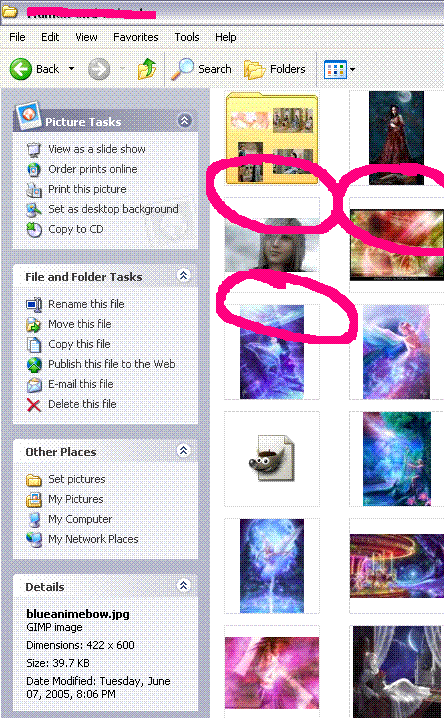
Image

It's just in this one particular folder. Every other folder shows the name of the file and the filetype, but I can't figure out how to make this folder get with the program. :P

_________________
Image
Click here, click here! Don't be a c-c-c-combo breaker! :D
THANK YOU ZILARY. <3


Top
 
   
 Post subject:
PostPosted: Wed Feb 22, 2006 12:11 am 
PPT God
PPT God
Offline

Posts: 2364
Joined: Mon May 31, 2004 4:19 pm
Website: http://www.speculationcentral.com
Yahoo Messenger: DFire870
Location: Austin, Texas
Right-Click > View > Icons

I'm not sure if that'll fix it, as in my folders when I go to Thumbnails (what you're currently on) the file names are there, so I dunno.

_________________
Image

Speculation Central - Thinking about the future... Today!


Top
 
   
Display posts from previous:  Sort by  
Post new topic  This topic is locked, you cannot edit posts or make further replies.  [ 6 posts ] 

All times are UTC


You cannot post new topics in this forum
You cannot reply to topics in this forum
You cannot edit your posts in this forum
You cannot delete your posts in this forum

Search for:
Jump to:  
Powered by phpBB® Forum Software © phpBB Limited