
New Site Layout (Split IV)
I don't like the new gray boxes either - seeing the orange-outlined images and the white grid and the little horizontal rules (between the names and the attributes, eg. "(special)") all at the same time seems too cluttering to the eye, especially contrasted to the look it had before. I'd rather they get rid of the horizontal rules and collapse the attributes closer to the items' names again, then increase the vertical gaps such that the white-on-gray grid structure would be unnecessary.
~Habitual over-analyzer
AySz88 wrote:I don't like the new gray boxes either - seeing the orange-outlined images and the white grid and the little horizontal rules (between the names and the attributes, eg. "(special)") all at the same time seems too cluttering to the eye, especially contrasted to the look it had before. I'd rather they get rid of the horizontal rules and collapse the attributes closer to the items' names again, then increase the vertical gaps such that the white-on-gray grid structure would be unnecessary.
The second part of your paragraph made my brain shut off because I got kinda confused, but I'm pretty sure I agree. When I look at my inventory now, it just bothers and kinda hurts my eyes. Like..the grey color is too light so having it ontop of the white just doesn't work for me. And (I think this is what you were saying) I don't like the white gaps between the items and the side bar. Visually, it's too jumpy and bothers my eyes.

-
mistressofdarkarts

- Newbie

- Posts: 46
- Joined: Fri Mar 11, 2005 4:19 am
- Location: O-HI-O
Um- where did my SDB link go to on my inventory page?
Jump to : Closet | Quick Stock | Equipped Items | Stamps | TCG Album | Item Gallery | Item Event Log | Customise!
NEW!! Neopets Tool Bar | Neopets Mobile
I am tired, am I overlooking it? Ended up going to my gallery then using the SDB link there. Oh and I don't care for the new inventory page also. It looks too cluttered to my eyes with the grey boxes. Just my opinion though.
Jump to : Closet | Quick Stock | Equipped Items | Stamps | TCG Album | Item Gallery | Item Event Log | Customise!
NEW!! Neopets Tool Bar | Neopets Mobile
I am tired, am I overlooking it? Ended up going to my gallery then using the SDB link there. Oh and I don't care for the new inventory page also. It looks too cluttered to my eyes with the grey boxes. Just my opinion though.
It's easy to tell the difference between wrong and right-- the problem is deciding which wrong is more right. 
-
Daze
- Beyond Godly

- Posts: 4819
- Joined: Thu Jan 06, 2005 6:22 am
- Location: Somewhere outside of reality
I see a reason for the boxes:

The boxes will be coloured for special items.
On a side note: Why can we take the backgrounds out of the closet if we can't sell them, but they do go in the SDB and Gallery?
SDB box link has gone from the Quick Links . It was probably removed because it was not needed - we have a SDB link on our yellow menu bar (toolbar or shop bar - whatever it is called).
The boxes will be coloured for special items.
On a side note: Why can we take the backgrounds out of the closet if we can't sell them, but they do go in the SDB and Gallery?
SDB box link has gone from the Quick Links . It was probably removed because it was not needed - we have a SDB link on our yellow menu bar (toolbar or shop bar - whatever it is called).

Hmm, I was on my boyfriend's computer this morning and when I checked my inventory it was in the same new style but there was no grey box around each item, and I get back home and the boxes are still there.
And when they do release more backgrounds I hope they don't charge us for them. Attach them to paintbrushes, sure..but buying backgrounds seems really lame.
And when they do release more backgrounds I hope they don't charge us for them. Attach them to paintbrushes, sure..but buying backgrounds seems really lame.
-
SierraRaven
- PPT Trainee

- Posts: 511
- Joined: Wed Jun 16, 2004 9:55 pm
- Location: Deep in the Forest
Some of the links on the top of the page are not clickable for me, such as User Lookup and Event Notification. Is there something I need to adjust on my CSS sheet?? Currently, I have this:
div.ban,div#ban, #ban, .ban, #ban_spacer {display: none !important;}
.adBox {display: none !important;}
.ad_wrapper {display: none !important;}
Thanks for your help!
div.ban,div#ban, #ban, .ban, #ban_spacer {display: none !important;}
.adBox {display: none !important;}
.ad_wrapper {display: none !important;}
Thanks for your help!
Looking to buy Snowbunny Stamp and Sticky Snowflake Stamp. If you're selling, please PM me!

Code: Select all
div.ban_bottom,div#ban_bottom {
display: none !important;
}
div.ad_wrapper,div#ad_wrapper {
display: none !important;
}
td.neofriend,td#neofriend{
display: none !important;
}
Just updated mine to correct the most recent changes TNT made. Now you can block the ad, and leave the links intact, but it also leaves the giant image which is part of the theme you have set. :\

IDB Staff
-
Unitylejean
- PPT Student

- Posts: 278
- Joined: Mon Feb 26, 2007 2:56 am
- Location: Poland
Ok, I use firefox and adblock, which has been a great combination so far - blocking the ads and leaving the sidebar etc.
Today all of a sudden I get this weird little thingie:
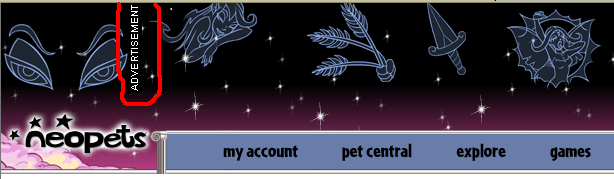
Anybody else got that?
EDIT: Hm, funny thing - the advertisment sign which I've markedand which overlays my topbar (figured out that "sidebar" is no longer a good word for it ) can be adblocked, but the others on the site can't.
Today all of a sudden I get this weird little thingie:
Anybody else got that?
EDIT: Hm, funny thing - the advertisment sign which I've markedand which overlays my topbar (figured out that "sidebar" is no longer a good word for it
) can be adblocked, but the others on the site can't. Unitylejean wrote:EDIT: Hm, funny thing - the advertisment sign which I've markedand which overlays my topbar (figured out that "sidebar" is no longer a good word for it
It's because the regular horizontal ones are just text, but they had to make that one an image so it would display sideways.

Self-referential signatures make the angels cry.
SierraRaven wrote:Some of the links on the top of the page are not clickable for me, such as User Lookup and Event Notification. Is there something I need to adjust on my CSS sheet??
Even after updating my CSS sheet as noted by GIR, I still can't click on user lookup, event notification, etc. on the topbar. I'm on Firefox v2 though, rather than IE. The new CSS sheet works a treat on IE
satiran wrote:SierraRaven wrote:Some of the links on the top of the page are not clickable for me, such as User Lookup and Event Notification. Is there something I need to adjust on my CSS sheet??
Even after updating my CSS sheet as noted by GIR, I still can't click on user lookup, event notification, etc. on the topbar. I'm on Firefox v2 though, rather than IE. The new CSS sheet works a treat on IE
You changed the one in your Firefox's chrome folder, right? Not just the IE stylesheet? Because those changes I made were to my Firefox stylesheet; I never use IE, so I didn't even bother with modifying its stylesheet.
Unitylejean wrote:Ok, I use firefox and adblock, which has been a great combination so far - blocking the ads and leaving the sidebar etc.
Today all of a sudden I get this weird little thingie:
Anybody else got that?
EDIT: Hm, funny thing - the advertisment sign which I've markedand which overlays my topbar (figured out that "sidebar" is no longer a good word for it
Did you try making the changes I mentioned above?
IDB Staff
GIR wrote:Code: Select all
div.ban_bottom,div#ban_bottom {
display: none !important;
}
div.ad_wrapper,div#ad_wrapper {
display: none !important;
}
td.neofriend,td#neofriend{
display: none !important;
}
Just updated mine to correct the most recent changes TNT made. Now you can block the ad, and leave the links intact, but it also leaves the giant image which is part of the theme you have set. :\
Thank you thank you thank you!!! *many hugs* It's SO nice to be able to see my whole theme without those ads.

